Showing posts with label Windows. Show all posts

Portable MicroXP 2011

1

Portable MicroXP 2011

Quote:
Portable MicroXP 2011
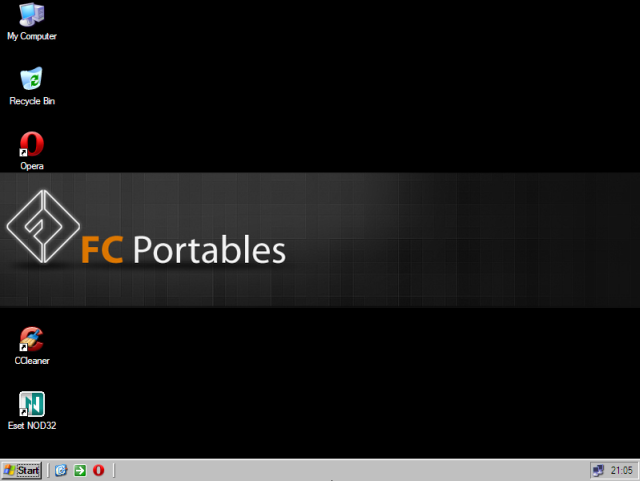
One of the smallest Windows XP. You can use 99% of the programs you always use.
Size | 563MB

Includes the installation of the default XP, drivers for Ethernet / Sound / SCSI / RAID. All languages kept, except Chinese, Japanese and Korean.

There is every keymap selection. Added Service Pack 3 Final. LAN network - Using the Map Network Drive and just put the computer name of the computer you want to talk.
Digital cameras and scanners can now also be used.

Installed software:
Opera 2011
CCleaner
NOD32 On-Demand scanner.


Code:
http://www.fileserve.com/file/pnVpkMA
or
http://www.wupload.com/file/46487908
or
https://rapidshare.com/files/2244150523/mcrxp2011.muzikfever.rar
or
http://www.filesonic.com/file/1389640824

Installing Windows from a USB flash drive

0

Installing Windows from a USB flash drive has several advantages – First of all, the overall speed of the installation process will increase significantly, carrying a USB stick is much more convenient than a DVD, and finally it becomes possible to install the OS even on those systems that do not have a DVD drive, such as a netbook.


In this post, I will show you how to load the Windows installation on to your USB flash drive and make it bootable just like the DVD.

Tools Required:

1. USB flash drive with a minimum capacity of 4 GB.
2. Windows 7 set-up DVD.

Step-1: Plug-in your USB flash drive and backup all the existing data in it.

Step-2: Open the command prompt. If you are using Windows 7/Vista then open it with administrator rights*.

* Goto Start -> All Programs -> Accessories -> Right-click on “Command Prompt” and select “Run as Administrator”.

Step 3: In the command prompt, type in the following command:

 
DISKPART

This will start the Microsoft DiskPart utility as shown below:

Now issue the following command:


LIST DISK


This will show you a list of  available disks on your system. Disk 0 is usually the hard disk. In my case, Disk 3 is the USB drive (this can be a different one in your case). Now issue the command as shown below:


SELECT DISK 3


NOTE: In the above command, 3 is the USB drive number on my system. If you have a different number on your system, then you need to replace 3 with that number.

Step-4: Now issue the following list of commands one by one as shown below:

CLEAN 
 
CREATE PARTITION PRIMARY 
 
SELECT PARTITION 1 
 
ACTIVE 
 
FORMAT FS=NTFS QUICK 
 
ASSIGN 
 
EXIT 
 
Minimize the command prompt and proceed to the next step.


Step 5: Insert the Windows 7/Vista installation disc and note down the “drive letter” of your DVD drive. In my case, it is “M:”. Now type the following list of commands as shown below:

M: CD BOOT 
CD BOOT 
BOOTSECT.EXE /NT60 N: (NOTE: N: is your USB drive letter)
EXIT 


Step-6: Copy the contents of your Windows 7/Vista installation disk into the USB flash drive.

That’s it! Your USB stick is now ready to boot and install the OS for you. Don’t forget to enable the “USB Boot” option and change the “boot priority to USB device from hard disk” in your BIOS settings.
 

Windows XP USB Flash Edition 2010 SP3 Genuine | 308 MB

0

Windows XP USB Flash Edition 2010 SP3 Genuine | 308 MB
Genre: Operating Systems

DISCRIPTION:
Guide to Install Include

* Platform: Windows XP SP3

* Compatibility Vista: Yes
* Requirements: 384 Mb, possibility boot from USB
* Add net and disk drivers.

Archive included 3 Directory: A, B, C

Step A - Formatting flash
Step B - Make bootable flash
Step C - copy all from directory C to flash

For more infomations, see picture in archive


DOWNLOAD:


Code:
http://www.wupload.com/file/34720869/XP_USB.part1.rar
http://www.wupload.com/file/34720683/XP_USB.part2.rar

New Themes For Windows 7

0


Code:
New Themes For Windows 7
OS : Windows 7 | Year : 2011 | 174 MB


Code:
http://www.wupload.com/file/32015802/New_Themes_Win7.rar

Code:
http://www.fileserve.com/file/AMSwAmZ/New_Themes_Win7.rar


Code:
http://www.filesonic.com/file/1293618054/New_Themes_Win7.rar


All in Windows Utilities

0


Lists

  • Adobe Reader
  • BMail
  • Context Editor
  • CS Diff
  • Daily planner
  • Edit plus
  • Excel Comparision Tool
  • FileZilla - FTP
  • Free Download Manager
  • Free SMTP Server
  • French - English Dictionary
  • ISO-Image converter
  • LAN Messenger
  • MS Office 2007 - 2003 Converter
  • MS Office 2007 - Save as PDF
  • MS Virtual PC 2007
  • Nero
  • PDF_to_Word
  • Primo PDF
  • Proxy server-Internet share soft
  • TeamViewer
  • TextPad
  • VNC Server & Viewer
  • Windows Live Messenger 8
  • ZoomIt - Presentation tool
  • WinRar

Microsoft Windows XP Professional SP3 Integrated June 2011 Corporate-BIE

0


Microsoft Windows XP Professional SP3 Integrated June 2011 Corporate-BIE | 624 Mb | FSn


Quote:
With Windows XP Professional Edition with Service Pack 3, you get safer browsing and communication, powerful security tools, and improved experiences. Windows XP is the operating system release that unifies the Microsoft range, with all the desktop versions now built on the NT/2000 code base rather than the shakier foundation of Windows 95, 98, and Me. That makes XP a great upgrade for users of the now-obsolete 9x and Me line, but for those already on Windows 2000 Professional it is a closer call. Despite the similar name, there is no special synergy between Windows XP and Office XP, which works fine on Windows 2000.


HowTo:
Quote:
Extract Files
Burn Image to CD
Boot from CD
Install...

Code:
http://www.filesonic.com/file/1229732001/biexpp611.iso
Code:
Password: funman

Big Fish Audio RIG Urban Workstation KONTAKT DVDR HAPPY EASTER

0


Big Fish Audio RIG Urban Workstation KONTAKT DVDR HAPPY EASTER
TEAM DYNAMiCS | April 2011 | DVD1: 6.0GB | DVD2: 7.87GB


Quote:
Big Fish Audio has been the industry leader in creating modern and edgy Hip Hop sample and loop libraries for years. At long last the perfect tool to get any amateur or seasoned Urban music producer the sounds they need for top of the line music production is here in RiG: Urban Workstation. Big Fish Audio has joined forces with the engineers at Vir2 to create a virtual instrument tailor-made for the hip hop and R&B producer. You don't have to weed through instrument after instrument to find the right sound since each instrument in RiG has been recorded and edited to create instant inspiration for you, the modern producer.

Details
Over 400 Instruments
Over 1200 Patches
Over 700 Loops
Custom Loop Editor
Synth Arpeggiator
Host Tempo Syncing
12 Included Main FX For All Instruments
Microtuning Control
Legato and Portamento
Volume Envelope Control

Instruments include:
Basses
Drum hits
Electric Guitars
Acoustic Guitars
Ethnic
Synths
Vocals
Pianos
Electric keys
Strings
Percussion
Sfx
Sliced loops
Drum loops
Horns
Organs
Orchestral Hits

R&B, Hip Hop, Guitar/Bass, Pop, Drums/Percussion, Piano/Keyboards, Synth/Electronic, Vocal


Code:
http://uploading.com/linklists/ee5965c8/Big.Fish.Audio.RIG.Urban.Workstation.KONTAKT.DVDR.D1.HAPPY.EASTER-DYNAMiCS/

Windows 8 Professional Edition RC1_xbuild7.0.1128

0

The themes work on X86 or X64, SP0, SP1, SP2.
The System files only work on Windows Vista SP1 x86.
Notice: This is only can be full use on Windows Vista SP1 x86.
===================================================================

NOTE: If you are getting error "Can't create file..." while saving a file after editing in resource hacker, that means you have edited and saved the same file in past and there is a backup file which need to be deleted before saving this file again. Go to the folder containing this file and you'll see a similar file having "_original" in its name. Delete it and try to save the file in resource hacker.

===================================================================

As you all know Windows 8 not yet been made.

Windows 8 provides lots of new features along with a newly designed interface. It looks very similar to Windows Vista but there are many GUI changes like redesigned taskbar, Explorer, new boot screen and login screen, etc.

If you are still using Windows Vista but want to enjoy the new Windows 8 look, then this tutorial will definitely help you.

After following this tutorial, you'll get the same Windows 8 look in your Windows Vista. Following is a list of things which are going to be changed after following this tutorial:

* Windows Theme or Visual Style
* Login Screen or Welcome Screen
* Taskbar
* Taskbar clock, System try icon & Quick Launch
* Wallpapers
* About Windows Box
* System Properties
* Extra

So here we start our transformation tour:

PS: Please create a Restore point using "System Restore" before applying anything mentioned in this tutorial so that you can restore your system back to a working state if anything goes wrong.

===================================================================

1. Windows Theme or Visual Style:

Windows 8 provides a new refreshing look which includes redesigned taskbar and start menu, Windows Explorer and a few other small changes.


Here a link: DOWNLOAD

To use 3rd party themes.
Patch Uxthemes with Universal Themes Patches

DOWNLOAD


===================================================================

2. Login Screen or Welcome Screen:

Windows 8 login screen looks similar to Vista login screen except the new background image and the text displayed at bottom.


Here a link: DOWNLOAD

===================================================================

3. Taskbar(Superbar):

Windows 8 taskbar has been highly redesigned it look like Winodws 7 taskbar. It doesn't show opened program's name in their taskbar buttons, instead it only shows their icons. Also the taskbar buttons are a bit large in their size.

Windows 8 taskbar also allows you to move taskbar buttons to change their positions, Same as Windows 7 taskbar.

Windows 8 taskbar also can be arrange in the pinned mode like Windows 7.

Has improved the taskbar preview to.


Here a link: DOWNLOAD
(ViGlance, Thanks to http://Lee-soft.com)

===================================================================

4. Taskbar clock, System try icon & Quick Launch:


Windows 8 improved the clock based on Windows 7 clock

New smart System Tray, Quick Launch with xPeek.

Here a link: DOWNLOAD
(Tclock Lite, http://homepage1.nifty.com/kazubon/tclocklight/ )

===================================================================

5. Wallpapers:

You can get Windows 8 wallpapers using following links.


Here a link: DOWNLOAD

===================================================================

6. About Windows Box:

You'll need to change the top logo in the About Windows dialog box so that it can look like Windows 8:


Here a link: DOWNLOAD

===================================================================

7. System Properties:

It will change look a like Windows 8 System properties.


Here a link: DOWNLOAD

===================================================================

8. Extra:

Tools needed to change Ownership

DOWNLOAD

Patch Uxthemes with Universal Themes Patches

DOWNLOAD

Windows Vista Ultimate SP2 (64 Bit) x64 and SP2 (32 Bit) x86 (December 2010)

0


Windows Vista Ultimate Service Pack 2 x86 (32 Bit)

Every Windows Update Is Integrated All The Way Up Too December 2010.

YOU "DO NOT" NEED A PRODUCT KEY!!
You Can Do A Custom Type Installation... Which Means,

You Have The Option To Format Your Existing Operating System... Or,

You Can Do A Upgrade Type Installation, Which Means.. You Get To Keep Your Old Files.

To Do A Upgrade, YOU MUST DO THE INSTALLATION FROM THE DESKTOP!!!

To Start The Upgrade Installation From The Desktop.....

Place The Dvd In The DVD Drive....

Open "My Computer",

"Right Click" On The DVD,

Click On "Open"..

You Will See 11 Files,

Click On (- "Setup" -)


Windows Upgrade Type Installation Will Start After You Click On "Setup"

I've Included Several Differnt Activation Tools In This File,

And Alot Of Other Helpfull Information & Instructions.


Code:
http://www.duckload.com/download/2850045/USB_Drive_Type_Windows_Installation_Program.rar
http://www.duckload.com/download/2850043/File_Sharing_Programs.rar
http://www.duckload.com/download/2850035/Extra_Unique_Programs.rar
http://www.duckload.com/download/2850026/ISO_Burning_Programs.rar
http://www.duckload.com/download/2850020/Driver_Genius_Professional_Edition_10.0.0.526.rar
http://www.duckload.com/download/2850017/Windows_Installation_Instructions_NEW_.rar
http://www.duckload.com/download/2850014/Extra_Activation_Programs.rar
Windows Vista
--------------------------------------------------------------------------------

Windows Vista System Requirements (Vista Capable)
Processor: 800 MHz
Memory: 512 MB
Graphics Card: DirectX 9.0 capable
Graphics Memory: 32 MB
HDD Capacity: 20 GB
HDD Free Space: 15 GB
Other Drives: DVD-ROM

--------------------------------------------------------------------------------

Windows Vista System Requirements (Vista Premium Ready)
Processor: 1 GHz
Memory: 1 GB
Graphics Card: DirectX 9.0 capable and WDDM 1.0 driver support
Graphics Memory: 128 MB
HDD Capacity: 40 GB
HDD Free Space: 15 GB
Other Drives: DVD-ROM

--------------------------------------------------------------------------------

Physical Memory (RAM) Limits In 32-bit Windows

Windows Vista Ultimate: 4 GB
Windows Vista Enterprise: 4 GB
Windows Vista Business: 4 GB
Windows Vista Home Premium: 4 GB
Windows Vista Home Basic: 4 GB
Windows Vista Starter: 1 GB

--------------------------------------------------------------------------------

Physical Memory (RAM) Limit in 64-bit Windows

Windows Vista Ultimate: 128 GB
Windows Vista Enterprise: 128 GB
Windows Vista Business: 128 GB
Windows Vista Home Premium: 16 GB
Windows Vista Home Basic: 8 GB
Windows Vista Starter: N/A

Download Windows Vista Ultimate SP2 (32 Bit) x86

Code:
http://www.duckload.com/download/2850339/Windows_Vista_Ultimate_32_Bit_.iso
or
Code:
http://www.duckload.com/download/2850205/Windows_Vista_Ultimate_32_Bit_.iso.004
http://www.duckload.com/download/2850204/Windows_Vista_Ultimate_32_Bit_.iso.003
http://www.duckload.com/download/2850203/Windows_Vista_Ultimate_32_Bit_.iso.001
http://www.duckload.com/download/2850199/Windows_Vista_Ultimate_32_Bit_.iso.002
http://www.duckload.com/download/2850181/Windows_Vista_Ultimate_32_Bit_.iso.005
or
Code:
http://www.filefactory.com/file/b5641c3/n/Windows_Vista_Ultimate_(32_Bit).iso.001
http://www.filefactory.com/file/b564158/n/Windows_Vista_Ultimate_(32_Bit).iso.004
http://www.filefactory.com/file/b5640ff/n/Windows_Vista_Ultimate_(32_Bit).iso.005
http://www.filefactory.com/file/b56405g/n/Windows_Vista_Ultimate_(32_Bit).iso.004
http://www.filefactory.com/file/b56405a/n/Windows_Vista_Ultimate_(32_Bit).iso.003
http://www.filefactory.com/file/b563ha6/n/Windows_Vista_Ultimate_(32_Bit).iso.002


ACTIVATION

Code:
http://www.duckload.com/download/2850054/Windows_Vista_Activation_Reccomended_.rar
--------------------------------------------------------------------------------

Download Windows Vista Ultimate SP2 (64 Bit) x64

Code:
http://www.duckload.com/download/2851274/Windows_Vista_Ultimate_64_Bit_Disk_1.iso
http://www.duckload.com/download/2851221/Windows_Vista_Ultimate_64_Bit_Disk_2.iso
http://www.duckload.com/download/2851155/Windows_Vista_Activation_Reccomended_.rar
or
Code:
http://www.megaupload.com/?d=8B5XQBIF    Windows Vista Ultimate (64 Bit).part1.rar
http://www.megaupload.com/?d=0KT28C01    Windows Vista Ultimate (64 Bit).part2.rar
http://www.megaupload.com/?d=U2TBYEJG    Windows Vista Ultimate (64 Bit).part3.rar
http://www.megaupload.com/?d=0YB546CS    Windows Vista Ultimate (64 Bit).part4.rar
http://www.megaupload.com/?d=GY051I1W    Windows Vista Ultimate (64 Bit).part5.rar
http://www.megaupload.com/?d=KP7L08O0    Windows Vista Ultimate (64 Bit).part6.rar
http://www.megaupload.com/?d=ZVRYS5YB    Windows Vista Ultimate (64 Bit).part7.ra

Windows Server 2008

0


This DVD is NOT homemade, it’s the MSDN media subscribers version <<<(not available in MSDN downloads)>>> Part #(X14-82292). Bootable and working.
Unpack, install. Googlecrack patches wga too, read txt from /Crack before patching.

This DVD includes:
*Windows Server 2008 Standard (x86 and x64)
*Windows Server 2008 Enterprise (x86 and x64)
*Windows Server 2008 Datacenter (x86 and x64)
*Windows Server 2008 Standard (Server Core) (x86 and x64)
*Windows Server 2008 Enterprise (Server Core) (x86 and x64)
*Windows Server 2008 Datacenter (Server Core) (x86 and x64)


How to Install Windows Server 2008 Step by Step


Installing Windows Server 2008 is pretty straightforward and is very much like installing Windows Vista, but I thought I'd list the necessary steps here for additional information. For those of you who have never installed Vista before, the entire installation process is different than it used to be in previous Microsoft operating systems, and notably much easier to perform.
Note: Windows Server 2008 can also be installed as a Server Core installation, which is a cut-down version of Windows without the Windows Explorer GUI. Because you don’t have the Windows Explorer to provide the GUI interface that you are used to, you configure everything through the command line interface or remotely using a Microsoft Management Console (MMC). The Server Core can be used for dedicated machines with basic roles such as Domain controller/Active Directory Domain Services, DNS Server, DHCP Server, file server, print server, Windows Media Server, IIS 7 web server and Windows Server Virtualization virtual server.


Follow this procedure to install Windows Server 2008:


1. Insert the appropriate Windows Server 2008 installation media into your DVD drive. If you don't have an installation DVD for Windows Server 2008, you can download one for free from Microsoft's Windows 2008 Server Trial website.


2. Reboot the computer.


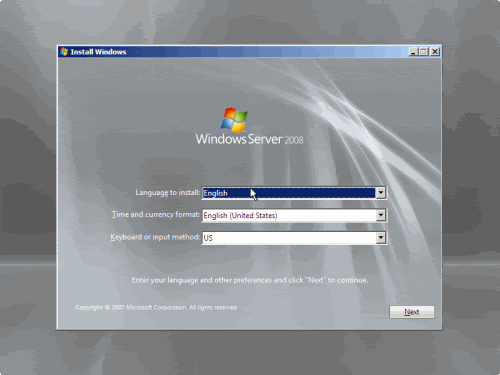
3. When prompted for an installation language and other regional options, make your selection and press Next.


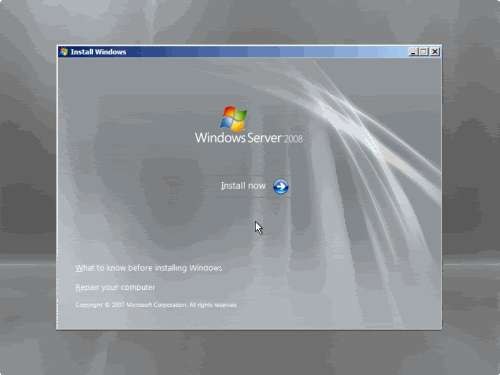
4. Next, press Install Now to begin the installation process.


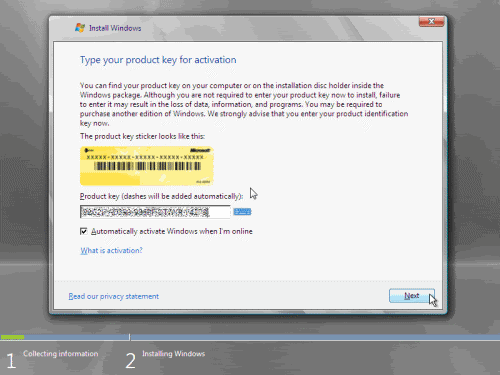
5. Product activation is now also identical with that found in Windows Vista. Enter your Product ID in the next window, and if you want to automatically activate Windows the moment the installation finishes, click Next.


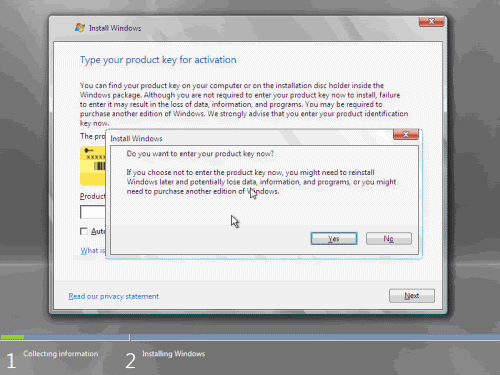
If you do not have the Product ID available right now, you can leave the box empty, and click Next. You will need to provide the Product ID later, after the server installation is over. Press No.


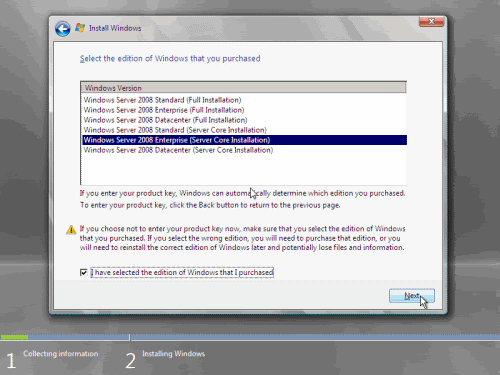
6. Because you did not provide the correct ID, the installation process cannot determine what kind of Windows Server 2008 license you own, and therefore you will be prompted to select your correct version in the next screen, assuming you are telling the truth and will provide the correct ID to prove your selection later on.


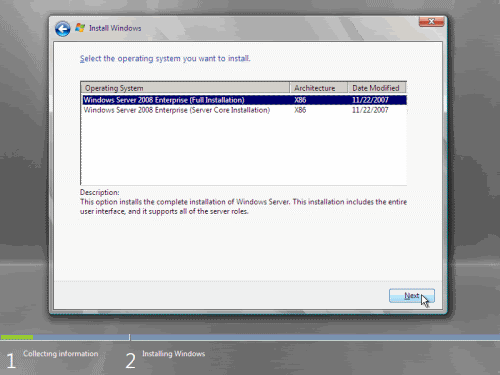
7. If you did provide the right Product ID, select the Full version of the right Windows version you're prompted, and click Next.


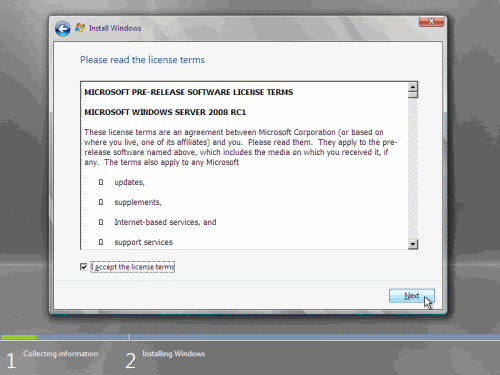
8. Read and accept the license terms by clicking to select the checkbox and pressing Next.


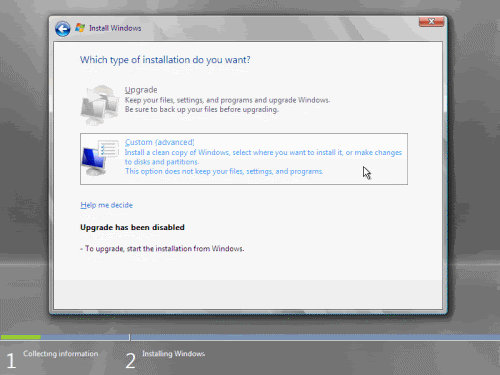
9. In the "Which type of installation do you want?" window, click the only available option – Custom (Advanced).


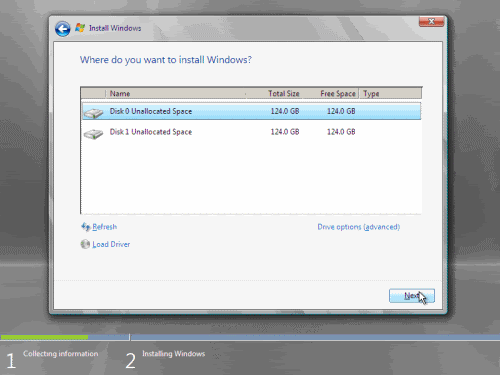
10. In the "Where do you want to install Windows?", if you're installing the server on a regular IDE hard disk, click to select the first disk, usually Disk 0, and click Next.


If you're installing on a hard disk that's connected to a SCSI controller, click Load Driver and insert the media provided by the controller's manufacturer.
If you're installing in a Virtual Machine environment, make sure you read the "Installing the Virtual SCSI Controller Driver for Virtual Server 2005 on Windows Server 2008"
If you must, you can also click Drive Options and manually create a partition on the destination hard disk.


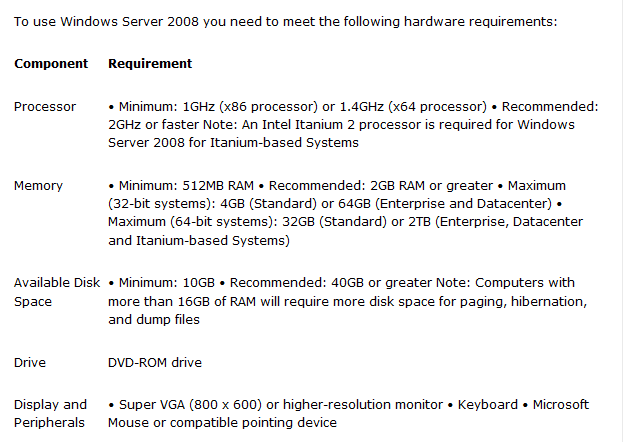
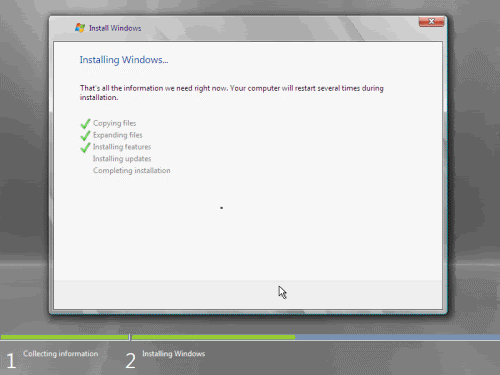
11. The installation now begins, and you can go and have lunch. Copying the setup files from the DVD to the hard drive only takes about one minute. However, extracting and uncompressing the files takes a good deal longer. After 20 minutes, the operating system is installed. The exact time it takes to install server core depends upon your hardware specifications. Faster disks will perform much faster installs… Windows Server 2008 takes up approximately 10 GB of hard drive space.


The installation process will reboot your computer, so, if in step #10 you inserted a floppy disk (either real or virtual), make sure you remove it before going to lunch, as you'll find the server hanged without the ability to boot (you can bypass this by configuring the server to boot from a CD/DVD and then from the hard disk in the booting order on the server's BIOS)


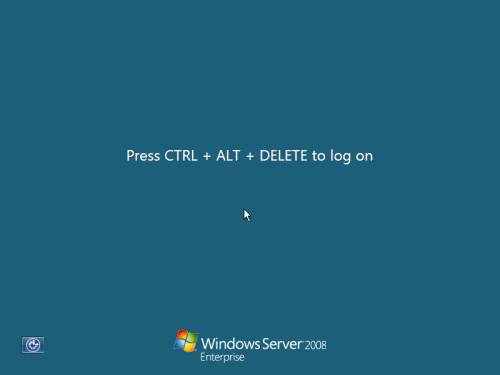
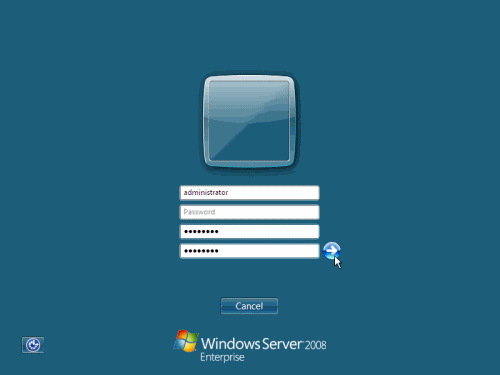
12. Then the server reboots you'll be prompted with the new Windows Server 2008 type of login screen. Press CTRL+ALT+DEL to log in.


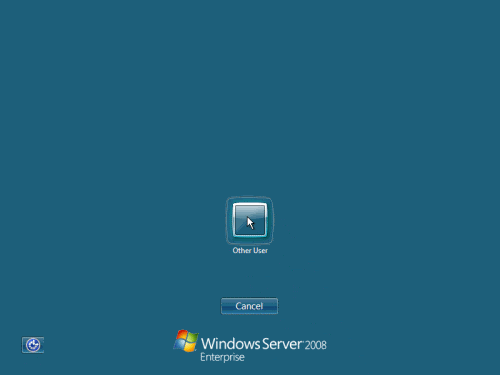
13. Click on Other User.


14. The default Administrator is blank, so just type Administrator and press Enter.


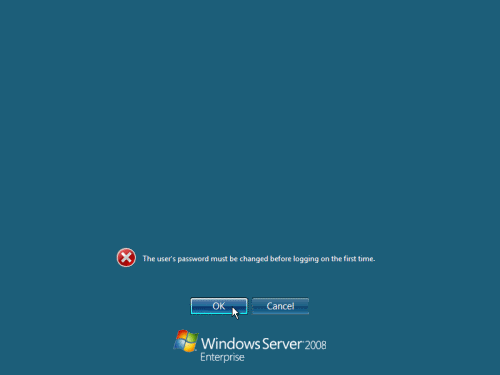
15. You will be prompted to change the user's password. You have no choice but to press Ok.


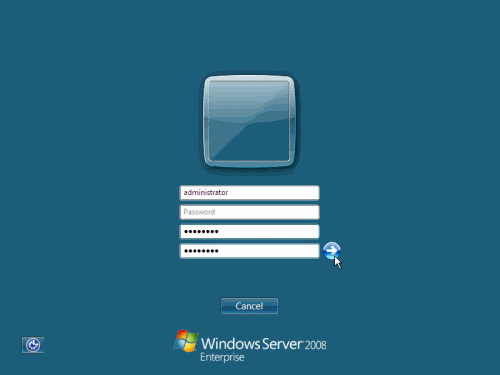
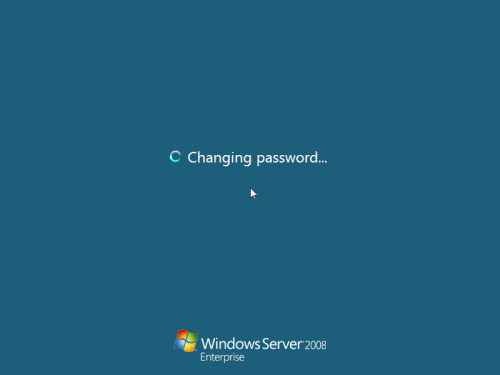
16. In the password changing dialog box, leave the default password blank (duh, read step #15…), and enter a new, complex, at-least-7-characters-long new password twice. A password like "topsecret" is not valid (it's not complex), but one like "T0pSecreT!" sure is. Make sure you remember it.


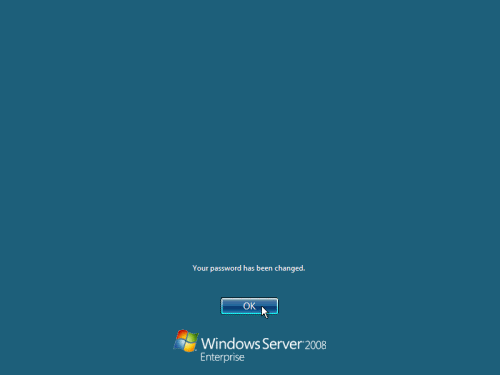
17. Someone thought it would be cool to nag you once more, so now you'll be prompted to accept the fact that the password had been changed. Press Ok.


18. Finally, the desktop appears and that's it, you're logged on and can begin working. You will be greeted by an assistant for the initial server configuration, and after performing some initial configuration tasks, you will be able to start working.

Next, for the initial configuration tasks please follow my other Windows Server 2008 articles found on the Related Windows Server 2008 Articles section below.
For Official Microsoft information on Windows Server 2008, see the:

Code:
http://www.duckload.com/download/1122550/W-2008-MSDN-DVD.iso
or
Code:
http://www.duckload.com/download/2846608/W-2008-MSDN-DVD.iso.001
http://www.duckload.com/download/2846584/W-2008-MSDN-DVD.iso.003
http://www.duckload.com/download/2846574/W-2008-MSDN-DVD.iso.002
http://www.duckload.com/download/2846573/W-2008-MSDN-DVD.iso.005
http://www.duckload.com/download/2846408/W-2008-MSDN-DVD.iso.004
or
Code:
http://www.filefactory.com/file/b5634e0/n/W-2008-MSDN-DVD.iso.001
http://www.filefactory.com/file/b5634de/n/W-2008-MSDN-DVD.iso.003
http://www.filefactory.com/file/b5634d0/n/W-2008-MSDN-DVD.iso.004
http://www.filefactory.com/file/b5634cg/n/W-2008-MSDN-DVD.iso.002
http://www.filefactory.com/file/b56349b/n/W-2008-MSDN-DVD.iso.005
or
Code:
http://www.rapidshare.com/files/447704123/W-2008-MSDN-DVD.iso.001
http://www.rapidshare.com/files/447704126/W-2008-MSDN-DVD.iso.002
http://www.rapidshare.com/files/447704124/W-2008-MSDN-DVD.iso.003
http://www.rapidshare.com/files/447704127/W-2008-MSDN-DVD.iso.004
http://www.rapidshare.com/files/447704125/W-2008-MSDN-DVD.iso.005
or
Code:
http://www.fileserve.com/file/JCWPteV/W-2008-MSDN-DVD.iso.004
http://www.fileserve.com/file/b99jkRm/W-2008-MSDN-DVD.iso.002
http://www.fileserve.com/file/776tuaC/W-2008-MSDN-DVD.iso.001
http://www.fileserve.com/file/7T4WBvR/W-2008-MSDN-DVD.iso.005
or

Code:
http://www.megaupload.com/?d=312CLF3F          W-2008-MSDN-DVD.iso.001
http://www.megaupload.com/?d=5R3U7IM1          W-2008-MSDN-DVD.iso.002
http://www.megaupload.com/?d=Y9BSC7C1          W-2008-MSDN-DVD.iso.003
http://www.megaupload.com/?d=XEITYQY4             W-2008-MSDN-DVD.iso.004
http://www.megaupload.com/?d=QWS2FXWG     W-2008-MSDN-DVD.iso.005
 
free counters

Subscribe in Bloglines

Total Pageviews

Score Card